Case study · Syndio
Global Pay Reports
Customers of Syndio historically used us soley for their pay equity analysis and nothing more. Upon the approval of the EU Pay Transparency Directive, Syndio had the market to build a new product for pay reporting.
- Role
- Frontend Engineer · UX
- Timeframe
- 2025 — 2026
- Team
- Design, PM, engineers
- Stack
- React, TypeScript, Figma

The problem
The EU Pay Transparency Directive which obligates 27 member states to file under standardized requirements starting in 2027. Alongside that certain countries within the EU had their down pay-data reporting. The UK has gender pay-gap reporting. Australia has WGEA. Every multinational employer has a growing list of country-by-country compliance burdens that don't talk to each other.
For Syndio's customers — global HR, compensation, and legal teams — non-compliance meant fines, audits, and contract clawbacks. The status quo was a tangle of spreadsheets, jurisdiction-specific consultants, and bespoke processes. The opportunity was to ship a single product that turned all of that into one workflow.
Global Pay Reports had to:
- Cover 35 jurisdictions across 43 countries at launch
- Generate accurate, jurisdiction-specific filings without forcing the customer to be a regulatory expert in every country
- Be auditable — every filing had to show its work
- Be accessible at WCAG 2.1 AA from day one (international contracts required attestation)
Research and Design
About 3 months
Compliance products that ignore the people doing the filing fail at launch. Before any code went in, we sat with the people who'd actually be doing this work.
I joined customer calls with HR directors and compensation analysts at multinational employers — companies running pilot pay-gap reports under interim regulatory guidance in the EU, and companies already filing in jurisdictions where reporting laws had been on the books for years (UK, Australia). Two findings reshaped our PRD:
- Cross-jurisdiction comparison was the killer feature. A multinational HR team didn't want 35 disconnected filing tools — they wanted one place to see every jurisdiction's status side-by-side, knowing the methodologies differed.
- The audit trail mattered as much as the report itself. Compliance officers wanted to show how a number was computed, not just submit the number. Every filing needed to be reproducible.
- Crawl, walk, run. The compliance space in 2025 for pay reporting was quick moving. We had to be first to market.
Design iterations
About 1 month
Simple UI. Dynamic UX
Guided vs team-assisted
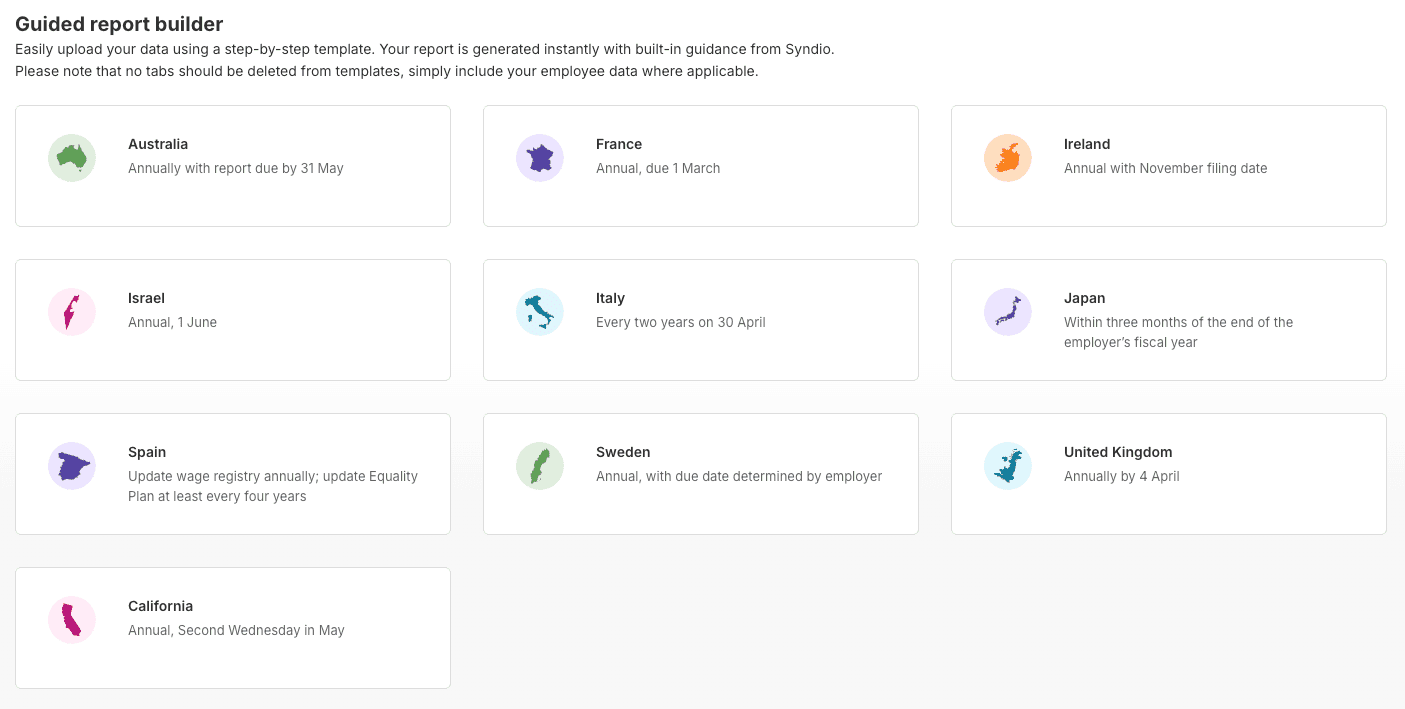
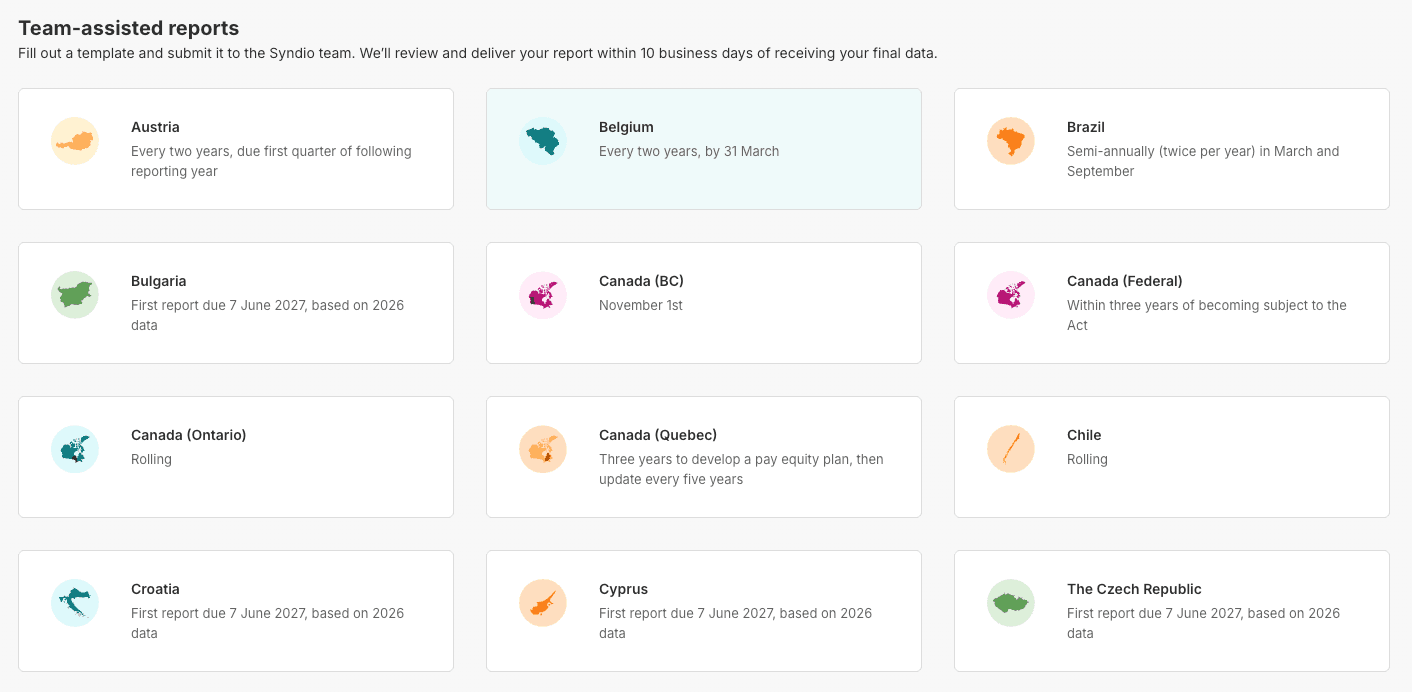
In accordance with our crawl, walk, run philosophy we sectioned the work off into two buckets: guided and team assisted reports.
All 35 reports started as team assisted reports. A customer fills an offline template provided by Syndio, hands it back, and the Syndio team produces the report by hand. The product surface for these is just a card pointing the customer at the template.
As we saw which reports were getting more most usage we prioritized that jurisdiction for automation into a guided report. In a guided report, a customer uploads their data, the product generates the regulatory report end-to-end, customer downloads it. No Syndio team involved in the day-to-day filing.
Jurisdiction Picker
Here a customer is able to find their jurisdiction and then follow their user path to filling out their report.
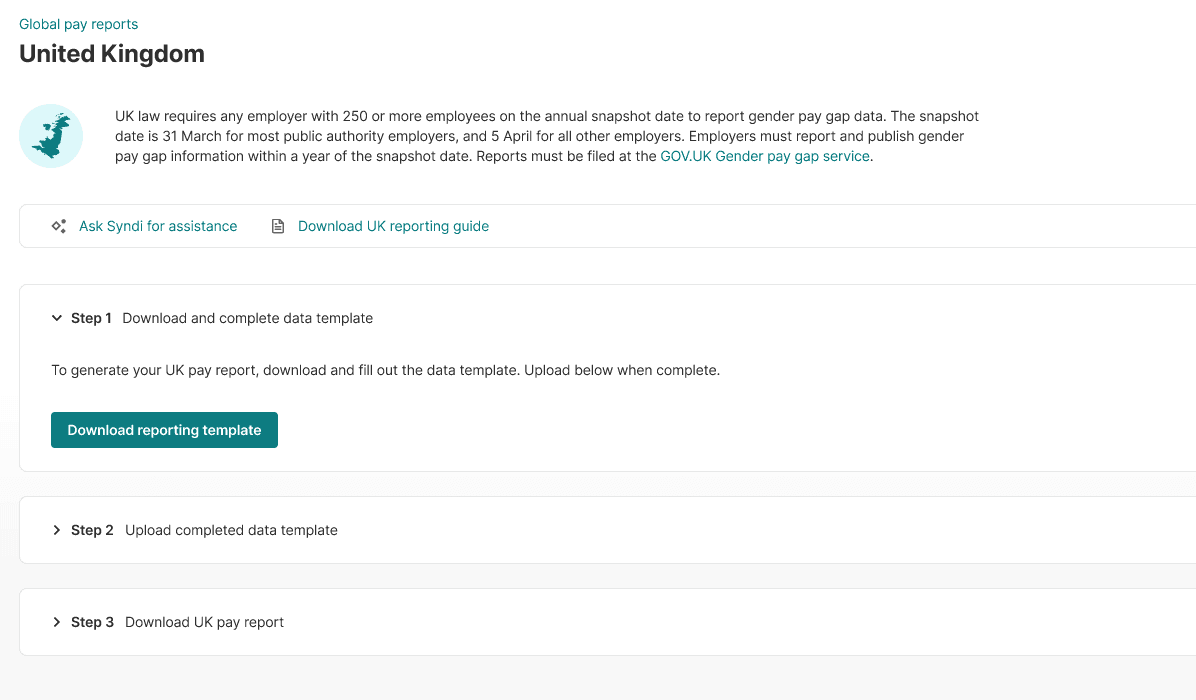
Each jurisdiction then opens into its own report wizard. The three-step rhythm — download a template, upload the completed data, download the generated report — stays the same across every country, but the regulatory context above it (snapshot dates, scope, where filings get submitted) is country-specific. A Syndi (LLM chatbox) shortcut and a country-specific reporting guide sit beside the steps so customers can ask questions or pull up the regulation without leaving the flow.
Implementation
2 months
This was a from-scratch product. I owned the frontend end-to-end — the repo, the build pipeline, the design-system integration, the accessibility framework, every component that shipped.
Building the repo for accessibility from day one
I set up the codebase so WCAG 2.1 AA compliance was structural, not retrofitted:
- Primitives — buttons, inputs, links, menus, dialogs — built with full keyboard support, focus management, and semantic HTML from the first commit. Design tokens drove contrast ratios; nothing could ship under 4.5:1 for normal text or 3:1 for large text.
- Composed components — data tables, the filing wizard, the comparison dashboard — wrapped primitives so the accessibility properties propagated automatically.
aria-liveregions handled async submission feedback. Long-running flows announced progress to screen readers. - Skip links, landmarks, and a logical tab order were baked into the page-level layouts. Every route was navigable end-to-end with the keyboard alone.
- Reduced motion, dark mode, and RTL weren't bolt-ons. The base layer respected
prefers-reduced-motionandprefers-color-scheme, and the layout supporteddir="rtl"because the product had to ship to right-to-left audiences in Israel.
CI/CD quality gate
I integrated Playwright + axe-core into CI as a quality gate. Every PR ran a full a11y regression sweep before merge — failing accessibility violations blocked the PR alongside failing tests. Two months in, accessibility was a green-check thing, not a "we'll fix it later" thing.
Cross-jurisdiction state machine
The dashboard's hardest engineering problem: a customer can have filings in 35+ jurisdictions, each with a different methodology, each in a different state (draft, in-progress, submitted, accepted, rejected, overdue). The UI had to read accurately at a glance without overwhelming. I modeled it as a state machine that compressed each filing into a canonical set of states, then worked with the designer on a visual language that telegraphed each one without relying on text labels alone — icon + color + microcopy together.
Outcome
Beyond the metrics, the deeper outcome was procedural: this was the first Syndio product to ship with accessibility as a structural property of the codebase rather than an audit at the end. The framework outlived the launch — every product since has piggybacked on it.
Reflection
- Accessibility as load-bearing infrastructure. Building WCAG into the primitives and putting axe in CI from the first commit was the highest-leverage decision of the project. Every later feature inherited compliance for free; retrofitting would have cost an order of magnitude more time.
- Show your work as a design principle. Compliance products live or die on their audit trail. Customers don't trust numbers they can't reconstruct. Every state-changing interaction in the product can answer why alongside what.
- Make jurisdiction differences explicit. Hiding methodological differences in the name of a clean UI is a compliance lie. The dashboard tells customers that Germany ≠ Spain, on purpose.